iOS — v24.0.0 · No Jailbreak Required

Summertime Saga
iOS Download
iPhone & iPad

Install Summertime Saga on your iPhone or iPad without jailbreak. Full sideload guide using AltStore or Sideloadly — compatible with iOS 13 and above.

Summertime Saga on iOS — At a Glance

Summertime Saga running on iPhone iOS
App NameSummertime Saga
Versionv24.0.0
File TypeIPA
DeveloperKompas Productions
Content Rating18+ / NSFW
Languages72+ Supported
RequiresiOS 13.0+
JailbreakNot Required
Install MethodSideload (AltStore / Sideloadly)
Internet RequiredNo — fully offline
Download IPA — v24.0.0

Can You Install Summertime Saga on iPhone?

Yes — Summertime Saga runs on iPhone and iPad without any jailbreak. The installation method is called sideloading, which lets you install IPA files that are not distributed through the App Store.

The two most reliable tools for this are AltStore and Sideloadly. Both are free, work on Windows and Mac, and do not require a paid Apple Developer account. You will need a computer for the initial setup, but the game runs completely independently on your device once installed.

The main thing to know upfront: free Apple certificates used for sideloading expire every 7 days. You need to refresh the certificate weekly using your sideloading tool. AltStore can automate this refresh in the background if your phone and computer share the same Wi-Fi network.

✓ No Jailbreak ✓ iOS 13–17 ✓ Offline Play ✓ Free Tools

What You Need Before You Start

Everything required to sideload Summertime Saga on iPhone or iPad.

Sideloading on iOS is straightforward but it does require a few things in place before you begin. Unlike Android where you just enable a toggle and install an APK, iOS sideloading involves your computer as an intermediary — at least for the first install and each certificate refresh.

Here is everything you need:

iPhone or iPad running iOS 13.0 or higher Compatible with all iPhones from iPhone 6s onward and iPads from iPad Air 2 onward. iOS 14, 15, 16, and 17 all supported.
A Windows or Mac computer Required for initial setup and certificate refreshes. Windows 10/11 or macOS 10.14 and above. The sideloading tool runs on your computer and pushes the IPA to your device over USB.
A USB cable (Lightning or USB-C) Used to connect your iPhone or iPad to your computer during installation. The original Apple cable or a quality third-party cable both work.
A free Apple ID Your regular Apple ID is enough. You do not need a paid Apple Developer account ($99/year). The free tier is sufficient for sideloading with 7-day certificate validity.
The Summertime Saga IPA file Download it from our download page. The file is approximately 1.2 GB — download on Wi-Fi. Save it somewhere easy to find on your computer.
2 GB of free storage on your device The installed game occupies approximately 1.5–1.8 GB. Check Settings → General → iPhone Storage before starting to confirm you have enough space.

AltStore vs Sideloadly — Which Should You Use?

Both tools are free and work without jailbreak. Here is the practical difference.

Recommended

AltStore

The most user-friendly option. AltStore runs in the background on your computer and automatically refreshes your certificate over Wi-Fi every 7 days — no manual steps needed after initial setup.

  • PlatformWindows & Mac
  • Auto-RefreshYes (Wi-Fi)
  • DifficultyBeginner Friendly
  • CostFree
AltStore Guide

Sideloadly

A lightweight desktop tool that gives you more control over the signing process. Better for users who prefer manual management or are troubleshooting issues with AltStore. Slightly more technical.

  • PlatformWindows & Mac
  • Auto-RefreshManual only
  • DifficultyIntermediate
  • CostFree
Sideloadly Guide

For most users, AltStore is the better choice — the automatic Wi-Fi refresh means you only go through the full setup process once. If you have already used AltStore for other apps and are comfortable with it, you can skip straight to the installation steps below.

If AltStore is giving you trouble with iTunes or iCloud detection, Sideloadly is a solid fallback that handles IPA signing independently with fewer dependency issues on Windows.

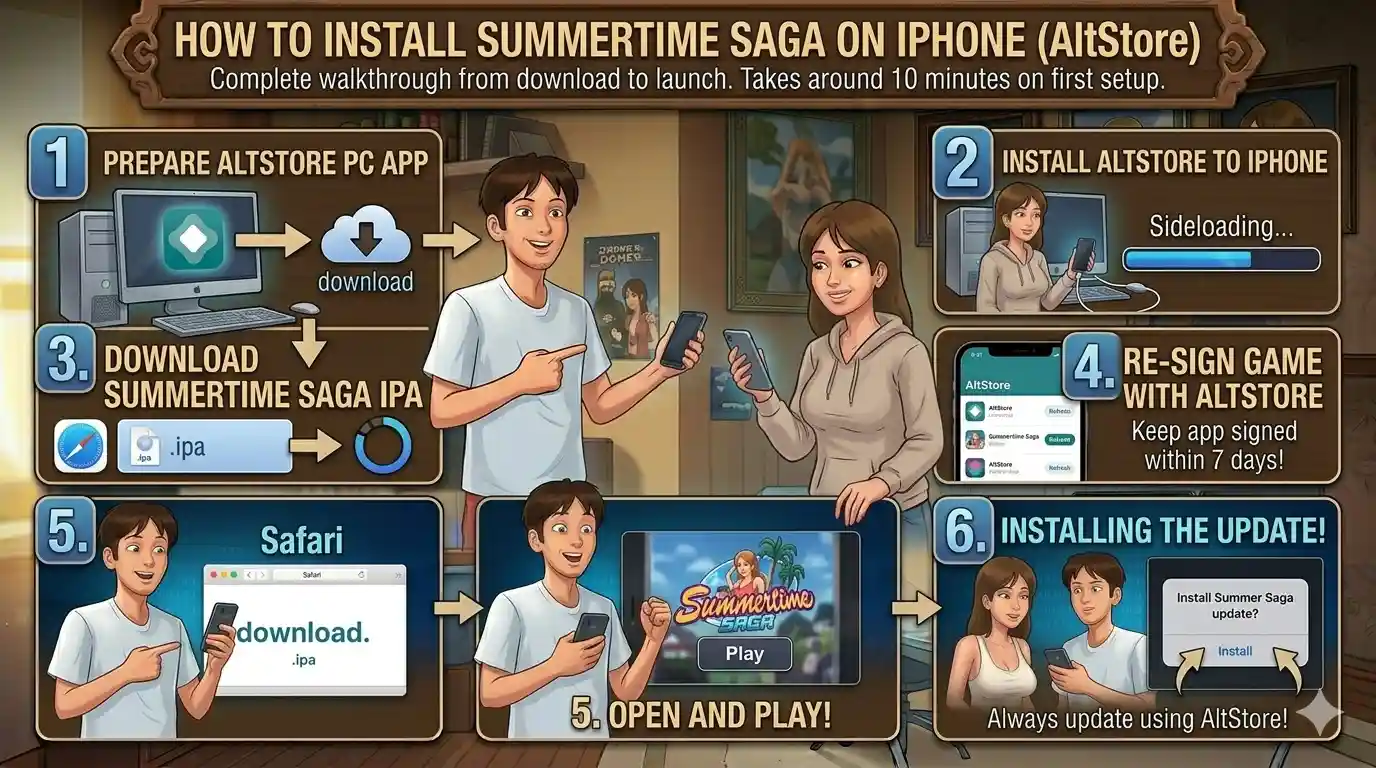
How to Install Summertime Saga on iPhone (AltStore)

Complete walkthrough from download to launch. Takes around 10 minutes on first setup.

AltStore sideload installation steps for Summertime Saga iOS

Download iTunes & iCloud

On Windows, install the non-Microsoft Store versions of iTunes and iCloud directly from Apple's website. AltStore requires these specific versions — the Microsoft Store builds do not work. On Mac, you can skip this step entirely.

Install AltStore on Your Computer

Download AltStore from the official site (altstore.io). On Windows, run the installer. On Mac, drag AltStore to your Applications folder and launch it — it will appear in your menu bar. Sign in with your Apple ID when prompted. This is the Apple ID used to sign the certificate; use one you are comfortable with.

Connect Your iPhone via USB

Connect your iPhone or iPad to your computer using a Lightning or USB-C cable. Unlock your device and tap "Trust" on the "Trust This Computer?" prompt. Open iTunes (Windows) or Finder (Mac) and confirm your device is visible. Do not disconnect during the install.

Install AltStore onto Your iPhone

In the AltStore menu bar icon, click "Install AltStore" and select your device from the list. Enter your Apple ID and password when asked. AltStore will push a small companion app to your iPhone — this is what handles future IPA installs and certificate refreshes.

Trust the Developer Certificate

On your iPhone, go to Settings → General → VPN & Device Management. Find the entry under your Apple ID email and tap "Trust". Without this step, iOS will block the app from opening. This is a standard iOS security prompt for any sideloaded app.

Sideload the Summertime Saga IPA

Open AltStore on your iPhone. Tap the My Apps tab, then the + button in the top-left corner. Navigate to the Summertime Saga IPA file you downloaded earlier. AltStore will sign and install the game. Installation takes 1–3 minutes depending on your device speed.

Using Sideloadly instead? Open Sideloadly, connect your device via USB, drag the IPA file into the Sideloadly window, enter your Apple ID, and click Start. The signing and installation process runs automatically. After install, go to Settings → General → VPN & Device Management and trust the certificate — same final step as AltStore.

App limit: Free Apple IDs can have a maximum of 3 sideloaded apps active at one time. If you hit the limit, you need to remove an existing sideloaded app before installing another. A paid Apple Developer account removes this restriction.

The 7-Day Certificate — What You Need to Know

Free Apple developer certificates expire every 7 days. When the certificate expires, the game icon stays on your home screen but the app will not open — you will see an "Unable to verify app" message instead.

To fix this, re-connect your device to your computer, open AltStore or Sideloadly, and refresh the certificate. The game and your save data are unaffected — only the certificate is renewed. With AltStore on the same Wi-Fi as your iPhone, this refresh can happen automatically in the background without any action from you.

Common iOS Installation Problems — Fixed

The issues most people run into, and exactly how to resolve them.

"Unable to Verify App" Error

Your certificate has expired. Connect your iPhone to your computer, open AltStore or Sideloadly, and refresh the certificate. Go to Settings → General → VPN & Device Management and re-trust the profile after refreshing.

AltStore Cannot Find iTunes / iCloud

On Windows, uninstall iTunes and iCloud from the Microsoft Store and reinstall them using the direct download from Apple's website (apple.com/itunes). AltStore is specifically incompatible with the Microsoft Store versions — this is the most common setup issue on Windows.

iPhone Not Detected by Computer

Unlock your device and tap "Trust" on the Trust This Computer prompt. If the prompt does not appear, try a different USB cable or USB port. Restart both your iPhone and computer. On Windows, make sure Apple Mobile Device Support is installed — it comes bundled with iTunes.

Maximum 3 Apps Reached Error

Free Apple IDs are limited to 3 sideloaded apps simultaneously. Open AltStore on your iPhone, go to My Apps, and delete a sideloaded app you no longer need. This frees up a slot. Alternatively, upgrading to an Apple Developer account removes this limit entirely.

App Crashes on Launch

This is usually a storage issue. The game needs approximately 2 GB of free space. Check Settings → General → iPhone Storage and clear space if needed. If storage is fine, try deleting the app and reinstalling the IPA fresh — the certificate signing occasionally gets corrupted on older iOS versions.

Certificate Not Refreshing Automatically

AltStore background refresh requires your iPhone and computer to be on the same Wi-Fi network with AltStore running. Make sure AltStore is open in your Windows system tray or Mac menu bar. If auto-refresh consistently fails, manual refresh via USB once a week is the reliable fallback.

Frequently Asked Questions

Also Available on Android and PC

Looking for a simpler install? Android is a single APK tap. PC runs natively on Windows and Mac.

Easiest Install

Android

Direct APK install. Enable unknown sources, tap the file, done. No computer needed, no certificate expiry. The MOD APK unlocks all content from the start.

  • Versionv24.0.0 MOD
  • RequiresAndroid 5.0+
  • RootNot Required
Android APK Guide

PC — Windows & Mac

Native executable for Windows 7+ and macOS. Best visual experience on a large screen. No certificate issues, no expiry — install once and play.

  • Windows7 / 8 / 10 / 11
  • MacmacOS 10.13+
PC Download Guide

Ready to Install on iPhone?

Download the IPA file and follow the guide above. Takes about 10 minutes from scratch.

Download IPA File
Telegram Updates